The AI Business Plan: how to use AI in your business
To use AI in business, start with the work, not the tool: choose a process full of back-and-forth, give AI the coordination and your people the decisions, add it to the systems you already run, control it from day one, and measure capacity, not minutes saved.
- Report
- 68

On this page
To use AI in business, start with the work, not the tool. Choose a process full of back-and-forth, give AI the coordination and your people the decisions, add it to the systems you already run, control it from day one, and measure what the team can carry, not the minutes one person saves. This plan shows how, from top to bottom.
This plan guides a company that wants to use AI in its business, from the first use case to a system that runs every day. It explains what AI is and the types a company can use, where each pays and where it does not, why a return on investment can mislead, how AI is added to the systems you already run, how it is controlled, who owns what, and in what order to do it. Nine chapters then take the same plan into nine industries.
It is written for owners, CEOs and operations leaders deciding where AI fits, and for the IT and data teams who will run it. Every figure comes from published research and official sources (McKinsey, Gartner, MIT, BCG, Eurostat, the regulators and the researchers named beside each figure), with its source in the references. A forecast is written as a forecast.
Etheon's role. Etheon is an AI software development firm. We build AI software for companies, and the apps, cloud and data it runs on. We formulate, design, create, test and ship it, and the code, the models and the accounts are yours. This plan describes the choices in the order a company makes them; section 7 describes how Etheon works, for readers who want to build with us.
1. How is AI used in business today?
Almost every large company now uses AI somewhere. Far fewer use it across the business, and fewer still see it in their profit. The gap is not the technology: it is where and how AI is put to work.
Use is near universal. Value is not.
McKinsey's survey of 1,719 people in 97 countries (May to June 2026) measures where companies stand [1]:
- Nearly nine in ten (89%) report regular use of AI in at least one business function.
- 56% use AI in three or more functions, up from 51% a year earlier.
- 44% report that AI is scaling across their enterprise, up from 38%.
- 37% attribute at least some EBIT impact to AI, "essentially unchanged from 2025".
- About 6% are what McKinsey calls AI high performers: an EBIT impact of 5% or more from AI, and "significant" value.
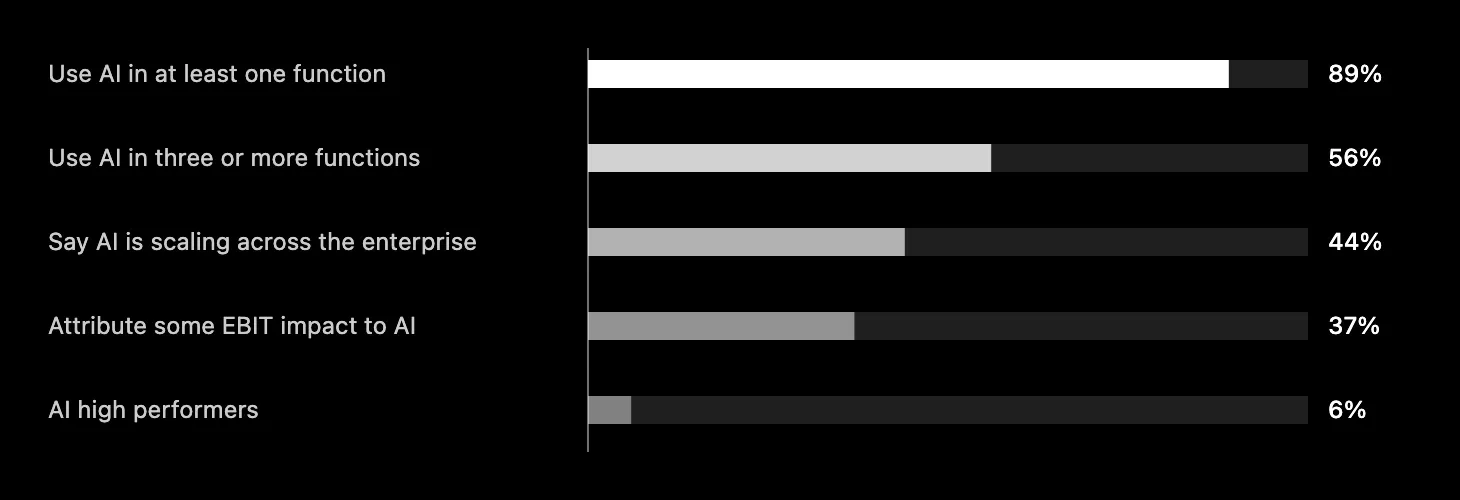
The same survey finds the gap at its sharpest between people and the company: 80% of respondents report that AI has improved their individual productivity, while 37% see any effect on earnings [1]. McKinsey's own senior partner calls it "the gap between individual gains and enterprise impact" [1].

What this says:
- Trying AI is no longer the question. Nearly nine in ten respondents' organizations already use it somewhere.
- Spreading it is. Fewer than half say AI is scaling across the business.
- Profit is the real test. About a third see any effect on earnings, and about 6% see a large one.
Why do AI projects stop?
The research names the same four reasons again and again: the data is not ready, the risks are not controlled, the costs rise, and the value is never proven.
- Generative AI pilots. In July 2024 Gartner predicted that at least 30% of generative AI projects would be abandoned after proof of concept by the end of 2025, "due to poor data quality, inadequate risk controls, escalating costs or unclear business value" [2]. In January 2026 Gartner reported that "at least 50%" had been [3].
- Agents. Gartner predicts that over 40% of agentic AI projects will be canceled by the end of 2027, "due to escalating costs, unclear business value or inadequate risk controls" [4]. It warns of "agent washing", existing assistants and chatbots rebranded as agents, and estimates that only about 130 of the thousands of agentic AI vendors are real [4].
- Data. Gartner predicts that through 2026, organizations will abandon 60% of AI projects unsupported by AI-ready data [5].
- Custom tools. MIT's NANDA project, from interviews with 52 organizations and a survey of 153 senior leaders, found that 60% of organizations evaluated custom enterprise AI tools, 20% reached a pilot and 5% reached production [6]. The authors call these findings preliminary and "directionally accurate".
Where the trouble comes from matters more than how often it comes. BCG's survey of 1,000 senior executives in 59 countries traced around 70% of the challenges of AI to people and processes, 20% to technology and only 10% to the AI algorithms themselves [7].

What is missing?
Companies are not short of AI. They are short of a plan for using it: which work to change, how, who owns it and how to tell whether it worked.
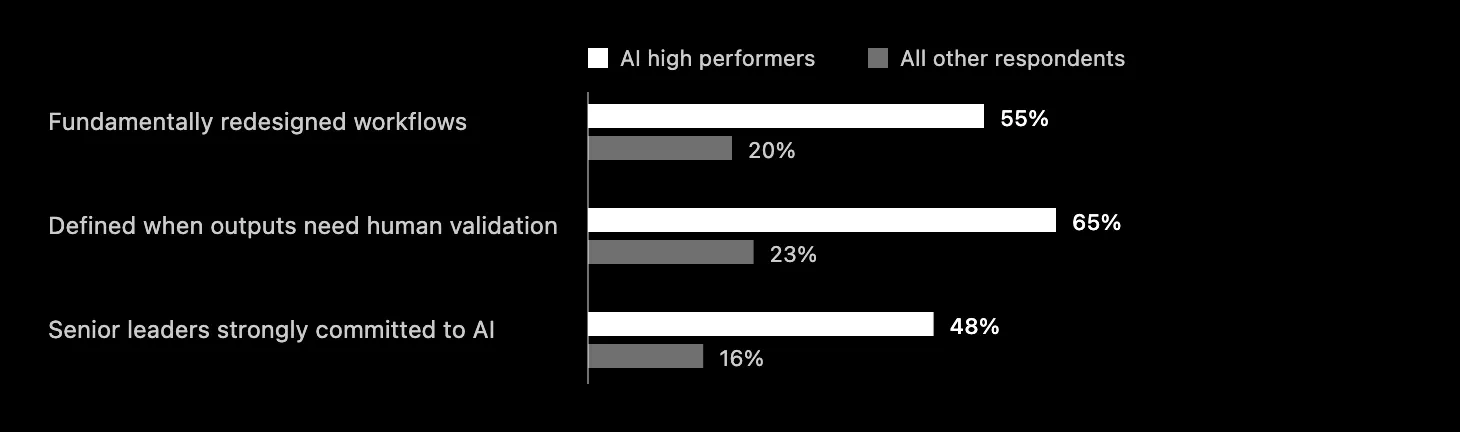
- The work is not redesigned. Nearly three-quarters of McKinsey's high performers report fundamentally redesigning workflows because of their AI use, against one-quarter of other respondents [1]. In 2025 McKinsey found that redesigning workflows had "one of the strongest contributions to achieving meaningful business impact" of all the factors it tested [8].
- The tools are horizontal, the value is vertical. McKinsey describes enterprise-wide copilots and chatbots that "have scaled quickly but deliver diffuse, hard-to-measure gains", while about 90% of function-specific use cases "remain stuck in pilot mode" [9].
- Leaders underestimate their people. In McKinsey's US survey, C-suite leaders estimated that 4% of employees use generative AI for at least 30% of their daily work; employees reported 13% [10]. McKinsey concludes that "employees are ready for AI. The biggest barrier to success is leadership" [10].
- People are not trained. 48% of employees rank training as the most important factor for adoption, and nearly half feel they receive moderate or less support [10].
Hint: the companies that see value change the work itself, not only the tools. Section 2.2 shows what that means in practice.
2. What types of AI can a business use?
Four types, each doing a different job at a different risk. Choose the type by the job, not by the name on the product.
The four types of AI
A. Assistants
- Definition: Software that drafts, answers and summarizes for one person, when that person asks.
- What it does: Saves time on a single task: an email, a document, a search, a first draft.
- What it changes: One person's speed. The company's capacity stays where it was.
- Risk level: Low: a person reads every answer before it is used.
B. Document and vision AI
- Definition: Models that read documents, forms, images and video, and turn them into data your systems can use.
- What it does: Reads invoices, contracts, delivery notes and claims, and checks them against your records.
- What it changes: The volume a team can process, and the errors that come from typing by hand.
- Risk level: Medium: a wrong reading becomes a wrong record unless it is checked.
C. Agents
- Definition: Software that takes a goal, plans the steps and acts in other systems (email, CRM, ERP) inside limits a person sets. McKinsey defines them as "AI systems based on foundation models that act in the real world and are capable of autonomously planning and executing multiple steps in a workflow" [1].
- What it does: Completes a task end to end: books, updates, replies, follows up.
- What it changes: Which steps of a process need a person, and which only need a person's approval.
- Risk level: Medium: it acts, so its limits, records and approvals must be set first.
D. Coordinating systems
- Definition: Several agents and people working one process together, each step handed on, checked and recorded.
- What it does: Runs the back-and-forth between your staff, your systems, your customers and your suppliers.
- What it changes: The load a team can carry. Staff handle the exceptions and the decisions; the system handles the traffic.
- Risk level: High until controlled: it needs every control in section 4.3.
Agents are early everywhere. Gartner's 2026 survey of CIOs found that only 17% of organizations have deployed AI agents, while more than 60% expect to within two years [11]. Among McKinsey's respondents, 40% at companies with more than $1 billion in revenue report scaling AI agents, up from 27% a year earlier, while smaller companies held at 22% [1].
Amplification, not replacement
Most companies point AI at single tasks, such as writing an email. The larger gain is in the work between tasks: the messages, follow-ups and checks that move one job from start to finish.
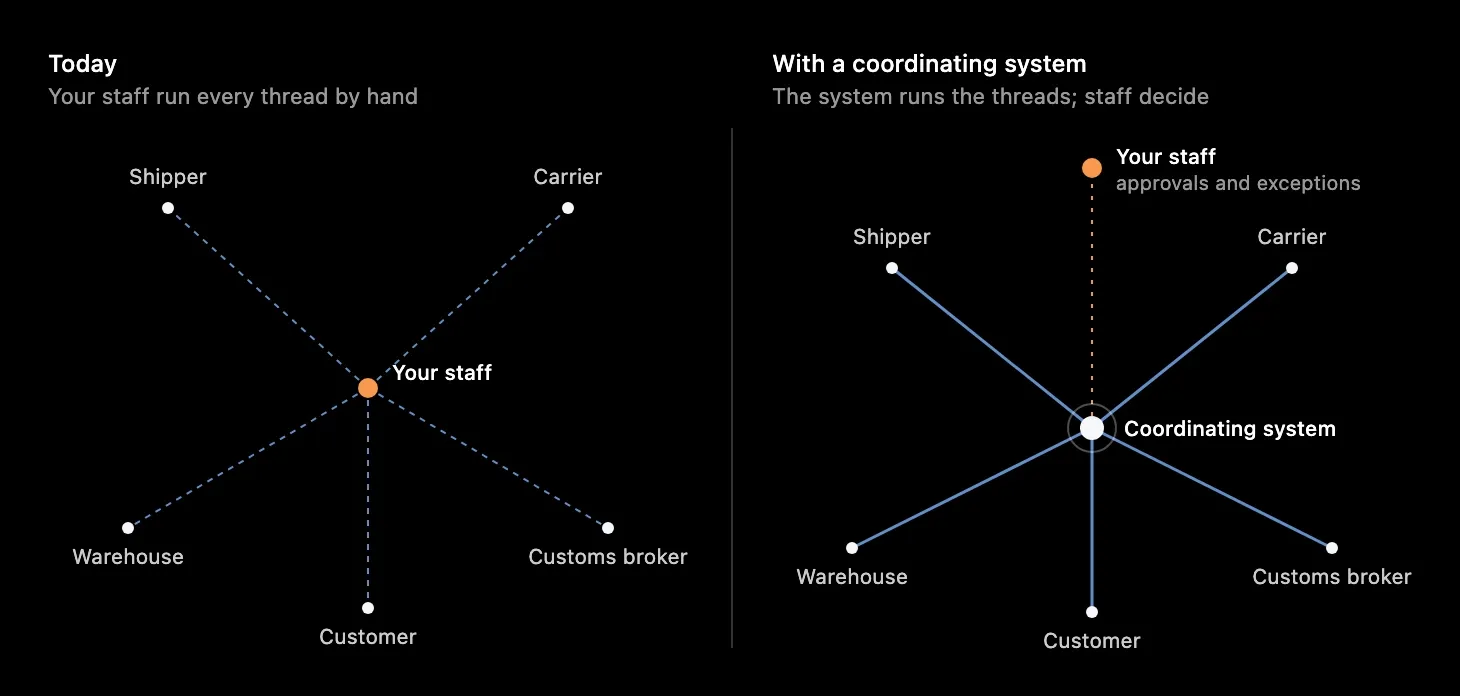
A freight shipment needs a quote, a booking with a carrier, a pickup time from the warehouse, papers for customs, updates for the customer and an invoice at the end. Each is a thread of emails and calls, and your staff sit in the middle of all of them. When volume rises, the threads multiply and the team either grows or falls behind.
A coordinating system takes the threads. It requests the quote, confirms the booking, chases the missing document, updates the customer and drafts the invoice, and it records every step. Your staff approve what needs approval and handle what goes wrong. The same team carries a higher load, and nobody's judgment has been replaced. The same pattern holds in every industry with heavy coordination: a claim, a loan file, a patient referral, a purchase order, a support case.
The research points the same way:
- People did more, and the least experienced gained most. In a study of 5,172 customer-support agents at a Fortune 500 software company, access to an AI assistant raised issues resolved per hour by 15% on average, and by 30% for less experienced and lower-skilled agents. Customers were "more polite and less likely to ask to speak to a manager" [12].
- The expected job cuts did not come. In 2025, 32% of McKinsey's respondents expected AI to reduce their workforce over the following year. In 2026, 14% reported that it had [1].
- Service leaders are keeping their people. Gartner predicts that by 2027, 50% of organizations that expected to significantly reduce their customer service workforce will abandon those plans; in its poll of 163 service leaders, 95% planned to retain human agents [13].
- Buyers are moving from assistants to outcomes. Gartner predicts that by 2028, over half of enterprises will stop paying for "assistive intelligence" and favor platforms that commit to workflow results [14].

Hint: start where the emails are. The process with the most back-and-forth per job is usually the first place a coordinating system pays.
Why does AI ROI mislead?
A return on investment built on minutes saved per person almost always misleads. Gartner notes that productivity gains "can be difficult to directly translate into financial benefit" [2], and in its 2024 survey 49% of respondents named estimating and demonstrating the value of AI as the primary obstacle to adoption [15].
Five ways the number goes wrong:
- Minutes are not money. Time saved becomes value only when the freed time takes on more work, or when the work needs fewer paid hours. A saved minute that is spent waiting is worth nothing.
- The pilot is costed, the system is not. A pilot's bill leaves out the integration, the review time, the monitoring and the running costs. One in five of McKinsey's respondents says their organization limits AI use because of operating costs, token costs included [1].
- The unit is wrong. "Hours saved per employee" hides whether the business moved. Count per job: per shipment, per claim, per case.
- The timing is wrong. A pilot is measured in its first weeks; the value comes after the work is redesigned around it (section 1.3).
- There is no baseline. Without the same measure taken before the change, any number after it is a guess.
Measure | What it shows | How to take it |
|---|---|---|
Jobs handled per person | The load the team can carry | Completed jobs divided by people, per week, before and after |
Time from request to completion | Speed for the customer | The time stamps in your system, start and end of each job |
Touches per job | How much back-and-forth remains | Messages, calls and hand-offs recorded per job |
Errors and rework | Quality | Jobs reopened, corrected or returned, as a share of all jobs |
Share of jobs needing a person | How far the system runs alone | Jobs escalated to staff, as a share of all jobs |
Cost per job | The full economics | Staff cost, AI running costs, support and integration, divided by jobs |
The worksheet, in two lines:
- Capacity gain = (jobs per person after − jobs per person before) ÷ jobs per person before.
- Cost per job = (staff cost + AI running cost + support and integration) ÷ jobs completed, in the same period.
Hint: take the baseline before the pilot starts. Two weeks of honest numbers from today are worth more than any estimate afterwards.
3. How is AI used in different industries?
The plan is the same in every industry; the work is not. Each chapter takes one industry through the same questions: where the work piles up, where AI helps, what the research says, the controls, what to measure and where to start.
4. How is AI added to a business?
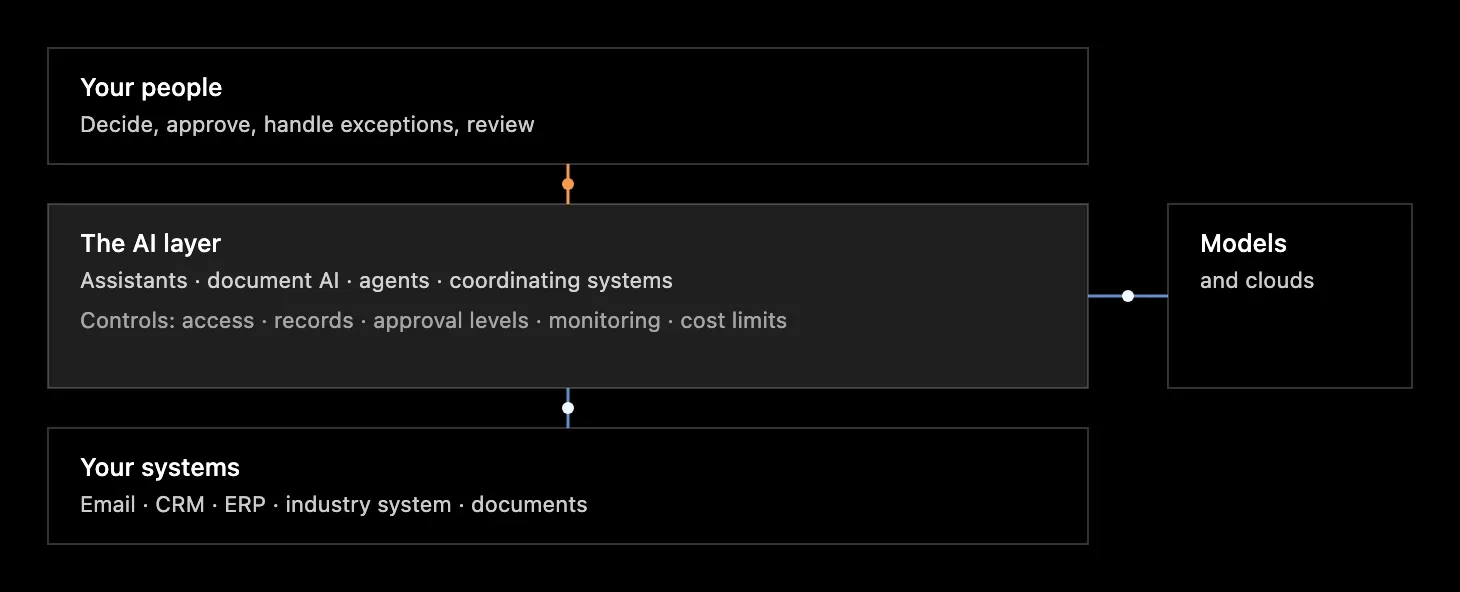
AI is software. It is added to the systems you already run, controlled like any system that acts on your behalf, and released, monitored and improved like any other software.
Inside: your data and your systems
I. Your systems
- Definition: The software the work already runs on: email and calendars, the CRM, the ERP, the industry system (a transport or warehouse system, an EHR, a core banking platform) and the document stores.
- What AI needs: Access through each system's own interface, with its own permissions, so every action is made and recorded where your team would make it.
- Risk level: Medium: an AI that can write to a system can make mistakes in it; section 4.3 sets the limits.
II. Your data
- Definition: The records, documents and history the AI reads to do the work.
- What AI needs: Data that is current, findable and allowed for the use. Gartner predicts that through 2026, organizations will abandon 60% of AI projects unsupported by AI-ready data [5].
- Risk level: High when ignored: most failed projects fail here first (section 1.2).
III. Identity and access
- Definition: Who and what may see and change each record.
- What AI needs: Its own accounts, never a person's password; the narrowest rights the task needs; every action under its own name.
- Risk level: Low when set first, high when added later.
Outside: models and clouds
The models are bought, not built. A foundation model (a large language model, or a vision or speech model) comes from a model provider and runs through your cloud provider or the model provider's own service. The choice follows the task: the quality the task needs, where the data may be processed, the response time and the cost per job. A small model that passes the task's tests is better than a large one that is slower and dearer.
What stays yours is everything around the model: the instructions, the tools it may call, the evaluation set that proves it works, the records of what it did, and the integration with your systems. That is where the value and the control sit, and it is software you should own.
What controls does AI need?
The controls are set before the AI acts, not after the first incident. Gartner predicts that by 2027, 40% of enterprises will demote or decommission autonomous AI agents because of governance gaps found only after production incidents [16]. It also warns against one rule for every agent: too strict for simple agents, too loose for autonomous ones [16].
I. Access and authorization: each AI system acts under its own identity, with the narrowest rights its task needs, and nothing it is not allowed to touch is within reach.
II. Data and privacy: the data each task may read is listed; personal data is limited to what the task needs; the model provider does not train on your data unless you opt in; the data stays in the region you choose.
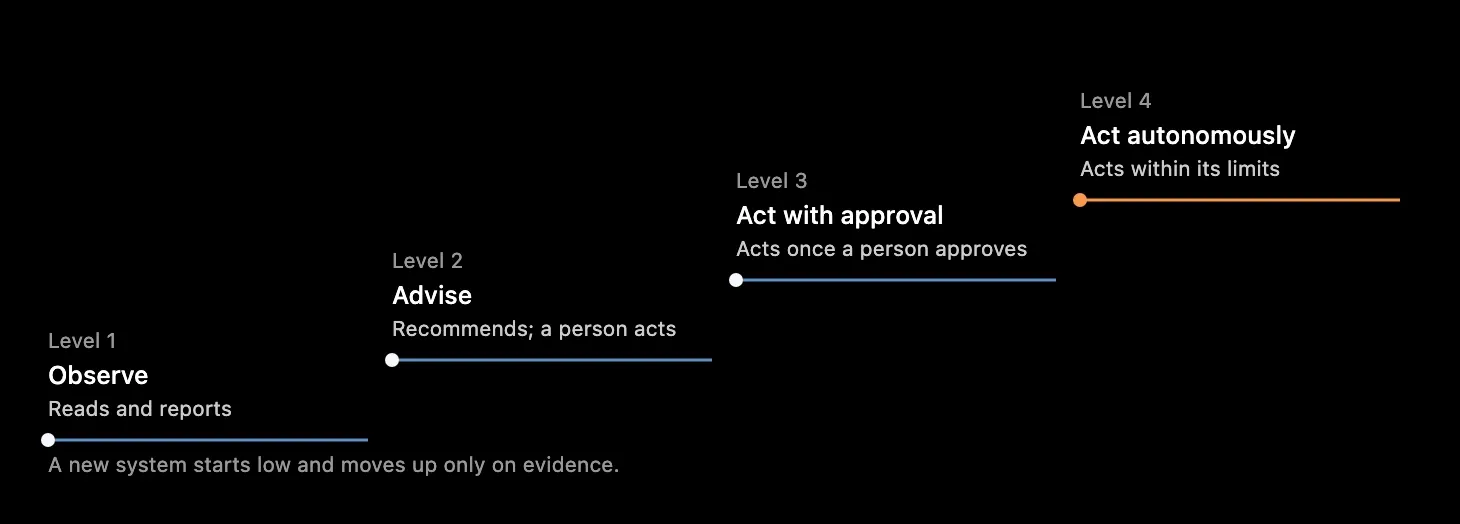
III. People in the loop: each action has a level, set by its risk. Gartner names four: observe, advise, act with approval, act autonomously [16]. A new system starts low and moves up only on evidence. In 2025, 65% of McKinsey's high performers had defined processes for when a model's output needs human validation, against 23% of others [8].
IV. Release gates: nothing reaches your users until it passes a set of tests built from your own cases. Every agent Etheon builds passes the same seven release gates as every model it builds: task quality, grounding, safety, privacy, latency, cost and drift.
V. Monitoring: quality, errors, response time and cost are watched in production, with alerts, so a change in the model or in your data is seen before your customers see it.
VI. Cost: a budget per job and per month, with limits the system cannot pass, and the cost per job reported with the other measures (section 2.3).
VII. Records: every step the AI takes is logged (what it read, what it decided, what it did and who approved it), so your team can replay any job and answer any question about it.
VIII. Periodic review: at a fixed interval, and after every major change, the owner of the workflow reviews the measures, the incidents and the levels of autonomy, records the findings and the actions, and signs the review.
Hint: write the controls in the same document as the use case. A use case that cannot name its controls is not ready to build.
How easy is it to run and manage?
Easier than most companies expect, when it is built to be run. A system in production needs an owner for each workflow, someone in IT who keeps it connected and monitored, and a release routine for changes. None of that is new work for a company that already runs software; it is the same work, applied to one more system.
How to buy AI delivery without being trapped by it:
- Own the code, the models and the accounts from the first day: the repository, the cloud accounts and the trained models in your company's name.
- Agree the exit plan at the start. Gartner predicts that by 2028, 70% of enterprises will abandon agentic AI built by vendor forward-deployed engineering, "trapped by soaring costs and unable to evolve it on their own" [17]. Its advice: execute the exit plan established at the start [17].
- Have your team shown how to run it, with the runbooks and the documents in your hands, so another team could pick it up.
5. Who owns what in an AI-ready company?
AI changes the work of every department a little, and one role a lot: the owner of each workflow. High performers are twice as likely as others to say their senior leaders demonstrate commitment to AI and that they have defined processes to measure its impact [1].
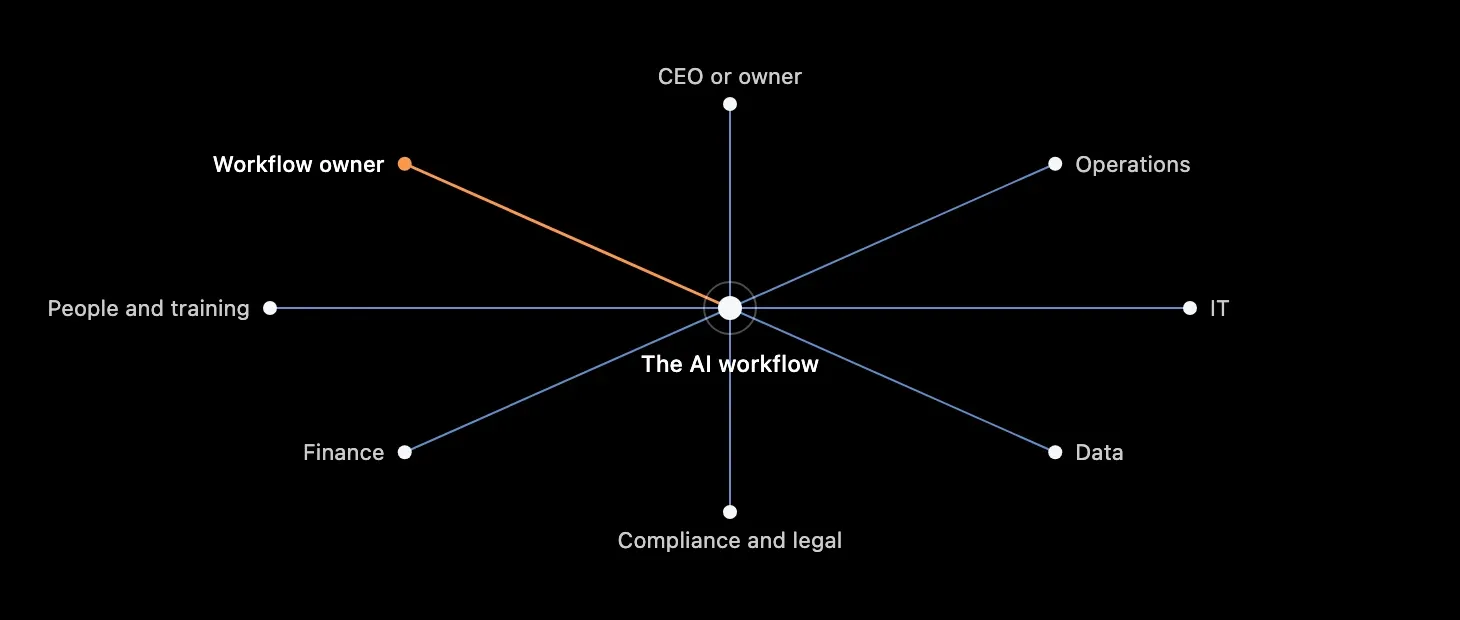
5.1 CEO or owner: sets the outcomes (capacity, speed, quality, cost), chooses the first workflows, and sponsors the change in the open. Responsible for the decision to scale or stop.
5.2 Operations: owns the workflows AI joins: the measures, the baseline, the exceptions and the day-to-day results.
5.3 IT: connects the systems, sets the identities and access, runs monitoring and releases, and keeps the records.
5.4 Data: makes the data ready for each use: current, findable, allowed, and with a named owner.
5.5 Compliance and legal: sets the controls each use needs, checks the rules of each market and industry, and reads the records.
5.6 Finance: holds the full cost per job and the budget limits, and judges the results against the baseline.
5.7 People and training: trains every team that works beside AI, and changes roles as the work changes. Employees rank training as the most important factor for adoption [10].
5.8 The workflow owner: one named person for each AI workflow, who approves what needs approval, handles the exceptions, and signs the periodic review. This role is new, and it is the one that makes the rest work.
6. How do you implement AI in a business?
Six steps, from the first conversation to the next release. Each step ends with something you can see and approve before the next begins.
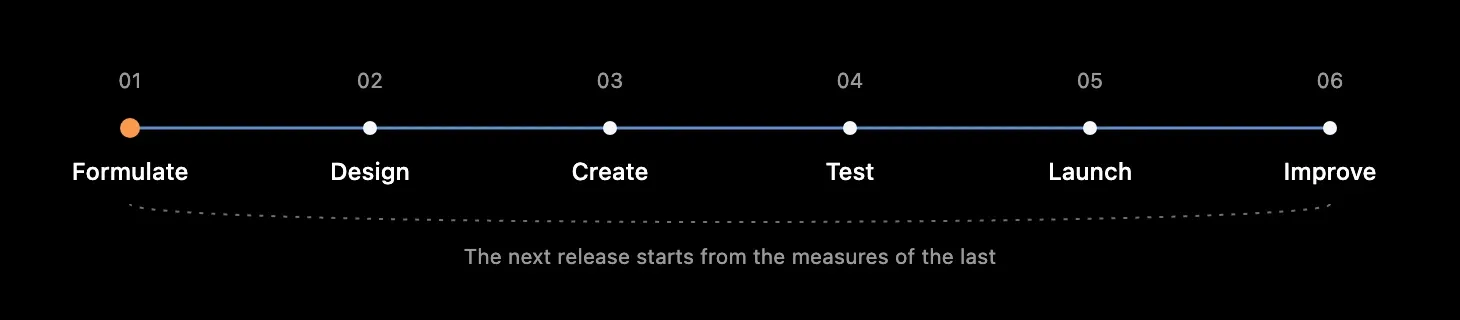
6.1 Formulate: the problem, the users, the data and how success is measured.
- The problem and its users, named.
- How success is measured, agreed (the measures of section 2.3, with their baseline).
- The data and the risks, listed.
6.2 Design: the product and its architecture, agreed before anything is built.
- The flows and screens, drawn.
- The architecture and the models, chosen.
- The build plan, agreed.
6.3 Create: the software and the models, built in short cycles.
- Working software shown at the end of each cycle.
- Your feedback in the next cycle.
- The code in your repository.
6.4 Test: every change tested and every model evaluated before release.
- Every change tested in the pipeline.
- Every model evaluated against the success measures.
- Security and performance checked.
6.5 Launch: released to your users in stages, each with a rollback.
- A first group of users, then the rest.
- A rollback ready at each stage.
- Your team shown how to run it.
6.6 Improve: real use measured, and the next release planned.
- Real use measured against the success measures.
- Issues fixed and models evaluated again.
- The next scope chosen by its results.
Hint: the length of each step depends on the scope, so fix the scope in step 1 and the timeline follows from it.
7. How do you work with Etheon?
Tell us your use case and timeline. We reply within one business day. A partner reads every brief, not a form queue, and if it fits, the next step is a 30-minute call.
Three ways to work with us:
- Dedicated team: a team that works only on your product. You set the priorities; we run the delivery.
- Fixed-scope project: an agreed scope and timeline, fixed before anything starts, with your sign-off at each milestone.
- Team extension: our engineers inside your team, in your process and your tools.
On every engagement the code, the models and the accounts are in your name, from the first commit. We never train models on your data without your opt-in, and your data stays isolated from other clients.
Contact: www.etheon.com · hello@etheon.com · +1 (415) 413-3959 · San Francisco, California.
8. Questions about how to use AI in business
How can AI be used in business?
AI can be used in business in four ways: assistants that draft and answer for one person, document and vision AI that reads documents into data, agents that complete tasks in your systems, and coordinating systems that run whole processes while staff decide. The largest gains come from coordination, not single tasks.
Will AI replace employees?
The evidence so far says it amplifies them. In McKinsey's 2026 survey, 14% of respondents reported that AI reduced their workforce, against 32% who expected it a year earlier. Gartner predicts half of the organizations planning large cuts in customer service will abandon those plans by 2027.
Why do AI projects fail?
AI projects fail for four reasons that recur in every study: data that is not ready, risks that are not controlled, costs that rise, and value that is never proven. BCG traced about 70% of AI challenges to people and processes, and only 10% to the algorithms themselves.
How do you measure the ROI of AI?
Measure what the team can carry, not the minutes one person saves: jobs handled per person, time from request to completion, touches per job, errors and rework, the share of jobs needing a person, and the full cost per job. Take the same measures before the change, as a baseline.
What is the difference between an AI assistant and an AI agent?
An assistant answers one person when asked, and the person decides what to do with the answer. An agent takes a goal, plans the steps and acts in other systems, such as email or an ERP, inside limits a person sets. Agents need access controls, records and approval levels before they act.
How do you start implementing AI in a business?
Start with one workflow full of back-and-forth, take its baseline measures, list its data, risks and controls, and build a first version that runs at the lowest level of autonomy, with a person approving each action. Raise the autonomy only as the evidence shows it is safe.
9. Definitions
- Agent: software that takes a goal, plans the steps and acts in other systems inside limits a person sets.
- Agent washing: Gartner's term for existing assistants, automation and chatbots rebranded as agents.
- AI-ready data: data that is current, findable, allowed for the use and fit for the task.
- Assistant: software that drafts, answers and summarizes for one person, when that person asks.
- Coordinating system: several agents and people working one process together, each step handed on, checked and recorded.
- Document and vision AI: models that read documents, images and video into data.
- Drift: a change in a model's results over time, as the model, the data or the work changes.
- EBIT: earnings before interest and taxes: the operating profit McKinsey's survey asks about.
- Evaluation set: cases from your own work, with the right answers, used to test an AI system before each release.
- Foundation model: a large model trained on broad data (a large language model, for example) that other software builds on.
- Grounding: keeping an AI system's answers tied to your own sources, so it says what your records say.
- High performer (McKinsey): a respondent who attributes an EBIT impact of 5% or more to AI and reports significant value from it.
- Human in the loop: a person approves or checks an AI system's output before it takes effect.
- Large language model (LLM): a foundation model that reads and writes text.
- Proof of concept: a first test that an idea works, before it is built for real use.
- Release gate: a test a system must pass before it reaches users.
- Token: the unit of text a model reads and writes, and the unit most model providers charge by.
- Workflow owner: the named person responsible for one AI workflow: its approvals, exceptions and reviews.
10. References
- McKinsey & Company, QuantumBlack, AI by McKinsey, "The state of AI in 2026: On the road to ROI", August 2026. Online survey, 4 May to 8 June 2026, 1,719 participants in 97 nations. https://www.mckinsey.com/capabilities/quantumblack/our-insights/the-state-of-ai (opens in a new tab)
- Gartner, "Gartner Predicts 30% of Generative AI Projects Will Be Abandoned After Proof of Concept By End of 2025", press release, 29 July 2024. https://www.gartner.com/en/newsroom/press-releases/2024-07-29-gartner-predicts-30-percent-of-generative-ai-projects-will-be-abandoned-after-proof-of-concept-by-end-of-2025 (opens in a new tab)
- Gartner, "Why 50% of GenAI Projects Fail — And How to Beat the Odds", Arun Chandrasekaran, 26 January 2026. https://www.gartner.com/en/articles/genai-project-failure (opens in a new tab)
- Gartner, "Gartner Predicts Over 40% of Agentic AI Projects Will Be Canceled by End of 2027", press release, 25 June 2025. https://www.gartner.com/en/newsroom/press-releases/2025-06-25-gartner-predicts-over-40-percent-of-agentic-ai-projects-will-be-canceled-by-end-of-2027 (opens in a new tab)
- Gartner, "Lack of AI-Ready Data Puts AI Projects at Risk", press release, 26 February 2025. https://www.gartner.com/en/newsroom/press-releases/2025-02-26-lack-of-ai-ready-data-puts-ai-projects-at-risk (opens in a new tab)
- MIT NANDA (Challapally, Pease, Raskar, Chari), "The GenAI Divide: State of AI in Business 2025", July 2025. Interviews with 52 organizations, survey of 153 senior leaders, review of over 300 public AI initiatives; preliminary findings. https://www.media.mit.edu/groups/nanda/overview/ (opens in a new tab)
- Boston Consulting Group, "AI Adoption in 2024: 74% of Companies Struggle to Achieve and Scale Value" (report: "Where's the Value in AI?"), 24 October 2024. Survey of 1,000 executives in 59 countries. https://www.bcg.com/press/24october2024-ai-adoption-in-2024-74-of-companies-struggle-to-achieve-and-scale-value (opens in a new tab)
- McKinsey & Company, QuantumBlack, AI by McKinsey, "The state of AI in 2025: Agents, innovation, and transformation", November 2025. Online survey, 25 June to 29 July 2025, 1,993 participants in 105 nations. https://www.mckinsey.com/capabilities/quantumblack/our-insights/the-state-of-ai-2025 (opens in a new tab)
- McKinsey & Company, QuantumBlack, "Seizing the agentic AI advantage", June 2025. https://www.mckinsey.com/capabilities/quantumblack/our-insights/seizing-the-agentic-ai-advantage (opens in a new tab)
- McKinsey & Company, "Superagency in the workplace: Empowering people to unlock AI's full potential", January 2025. Survey of 3,613 employees and 238 C-level executives, October and November 2024; findings for US workplaces. https://www.mckinsey.com/capabilities/tech-and-ai/our-insights/superagency-in-the-workplace-empowering-people-to-unlock-ais-full-potential-at-work (opens in a new tab)
- Gartner, "What the 2026 Hype Cycle for Agentic AI Reveals", Rajesh Kandaswamy, 15 April 2026 (citing the 2026 Gartner CIO and Technology Executive Survey). https://www.gartner.com/en/articles/hype-cycle-for-agentic-ai (opens in a new tab)
- Erik Brynjolfsson, Danielle Li, Lindsey R. Raymond, "Generative AI at Work", The Quarterly Journal of Economics, vol. 140, no. 2, pp. 889-942, 2025. https://academic.oup.com/qje/article/140/2/889/7990658 (opens in a new tab)
- Gartner, "Gartner Predicts 50% of Organizations Will Abandon Plans to Reduce Customer Service Workforce Due to AI", press release, 10 June 2025. https://www.gartner.com/en/newsroom/press-releases/2025-06-10-gartner-predicts-50-percent-of-organizations-will-abandon-plans-to-reduce-customer-service-workforce-due-to-ai (opens in a new tab)
- Gartner, "Gartner Expects Most Enterprises to Abandon Assistive AI for Outcome-Focused Workflow by 2028", press release, 2 April 2026. https://www.gartner.com/en/newsroom/press-releases/2026-04-02-gartner-expects-most-enterprises-to-abandon-assistive-ai-for-outcome-focused-workflow-by-2028 (opens in a new tab)
- Gartner, "Gartner Survey Finds Generative AI Is Now the Most Frequently Deployed AI Solution in Organizations", press release, 7 May 2024. Survey of 644 respondents in the US, Germany and the UK, fourth quarter of 2023. https://www.gartner.com/en/newsroom/press-releases/2024-05-07-gartner-survey-finds-generative-ai-is-now-the-most-frequently-deployed-ai-solution-in-organizations (opens in a new tab)
- Gartner, "Gartner Says Applying Uniform Governance Across AI Agents Will Lead to Enterprise AI Agent Failure", press release, 26 May 2026. https://www.gartner.com/en/newsroom/press-releases/2026-05-26-gartner-says-applying-uniform-governance-across-ai-agents-will-lead-to-enterprise-ai-agent-failure (opens in a new tab)
- Gartner, "Gartner Predicts 70% of Enterprises Will Abandon Agentic AI Built by Vendor Forward-Deployed Engineering by 2028", press release, 29 September 2026. https://www.gartner.com/en/newsroom/press-releases/2026-09-29-gartner-predicts-70-percent-of-enterprises-will-abandon-agentic-ai-built-by-vendor-forward-deployed-engineering-by-2028 (opens in a new tab)
Chapters. Each industry on its own page.
AI in logistics and freight
AI in logistics pays most when it runs the coordination around each shipment: quotes, bookings, pickup times, customs papers, status updates and invoices. Your staff approve and handle the exceptions, so the same team moves more freight.
AI in financial services
AI in financial services pays most when it reads the documents and coordinates the requests, alerts and hand-offs behind each loan, claim and payment. People keep every credit, claim and compliance decision. Start with one queue, count files per person, and apply the controls regulators require.
AI in healthcare administration
AI in healthcare pays first in administration: it drafts visit notes, reads referrals and forms, books patients and runs prior authorizations and claims to a decision. Clinicians keep every clinical decision; the system carries the forms, follow-ups and status checks under HIPAA's rules.
AI in retail and e-commerce
AI in retail pays most when it runs the follow-ups behind each order and return: tracking questions, carrier claims, refunds, restocking and supplier paperwork. Staff approve refunds and handle the exceptions, so the same team serves more orders.
AI in manufacturing
AI in manufacturing pays most when it carries the follow-ups that move an order through planning, purchasing, suppliers, the line and quality. Planners, buyers and quality engineers keep the decisions, and the same team can run more orders.
AI in real estate
AI in real estate pays most when it coordinates the deadlines, documents and messages behind each sale, lease and work order, while agents and managers keep every price, offer and applicant decision. Start with one flow, count jobs per person, and check every word against fair-housing rules.
AI for law firms and professional services
AI for law firms pays most when it reads documents and coordinates the requests, checklists and deadlines behind each matter, while lawyers keep every judgment. Accounting and consulting firms gain the same way. Start with one checklist, count matters per person, and verify every output.
AI in customer service
AI in customer service takes the volume: routine questions, case summaries, attachments and the follow-ups between teams that keep a case open. Your people take the judgment: exceptions, complaints, refunds outside policy and anyone who asks for a person. The same team resolves more cases.
AI in education
AI in education pays first around teaching: it drafts lesson materials, tutors students step by step, reads admissions documents and answers students and parents. Teachers keep the teaching and the grades, people keep admissions decisions, and student data stays under FERPA, COPPA and the GDPR.